How to Open VCF Files on Different Platforms?
A VCF refers to a
standard file format that is used to store contact data for an
individual or company. It usually includes a name, address, contact number,
email address, and other contact details. In this blog, we will go through the
process of opening VCF files.
On Gmail
You need to open VCF files on
Gmail. Here are the instructions given below.
●
First,
you have to go to Gmail in your browser.
●
After
that, you should input your email ID and password to login to your Google
account.
●
Then,
you have to click on "More."
●
Thereafter,
you should click on the "Import" option.
●
Later,
you have to click on "CSV or vCard file."
●
Now,
you should click on SELECT FILE".
●
After
that, choose the VCF file.
●
Then
click on "Open."
●
Thereafter,
you should click on "IMPORT."
On iCloud
If you want to open VCF files
on iCloud, you need to follow the steps given below.
●
To
begin with going to "www.icloud.com" in your preferred web browser.
●
After
that, you have to input your email ID and password to log in to your account.
●
Then,
you should click on "Contacts."
●
Thereafter,
you have to click on the Settings option.
●
Later,
you should click on "Import vCard."
●
Now,
choose the VCF file that you would like to open with iCloud.
●
After
that, you should click on "Open" to upload this file to your iCloud
contacts.
On Yahoo
You can open VCF files on
Yahoo. Here are the instructions given below.
●
Get
started by visit www.mail.yahoo.com in your preferred web browser.
●
After
that, you should type your email ID and password to sign in to your Yahoo
account.
●
Then
you have to click on the "Contacts" icon.
●
Thereafter,
you should click on "Import Contacts."
●
Click
on "import" next to the "File Upload."
●
Then,
you should click on "Choose file."
●
Thereafter,
you have to choose the VCF file.
●
Later,
you should click on "Open."
●
Now,
you have to click on "Import" to move all the contact list to Yahoo.
Through Outlook on Desktop
If you want to open VCF files
through Outlook on the desktop, you need to follow the steps given below.
●
First,
you have to launch the Outlook on your desktop.
●
After
that, click on File.
●
Then
you should click on "Open and Export."
●
Thereafter,
you have to click on Import or Export.
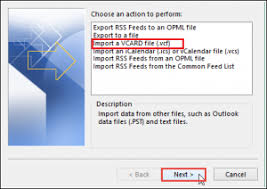
●
Later,
you should click on "import a VCARD file.
●
Now,
click on Next.
●
After
that, choose your VCF file.
●
Then
you have to click on "Open" to move to your VCF files into the
Outlook address.
Richard Turner is a creative person who has
been writing blogs and articles about cyber security. He writes about the
latest updates regarding office.com/setup
and how it can improve the work experience of users. His articles have been
published in many popular e-magazines, blogs and websites.
Comments
Post a Comment